
Download the Rarawin app and Play on Your Phone
Download the Rarawin app from rarawincasino.eu and play from your phone, with access to games, payments and personal controls. We keep those everyday tasks together so switching between them feels straightforward. Our service is for adults aged 18+ only.
Our App on Your Phone
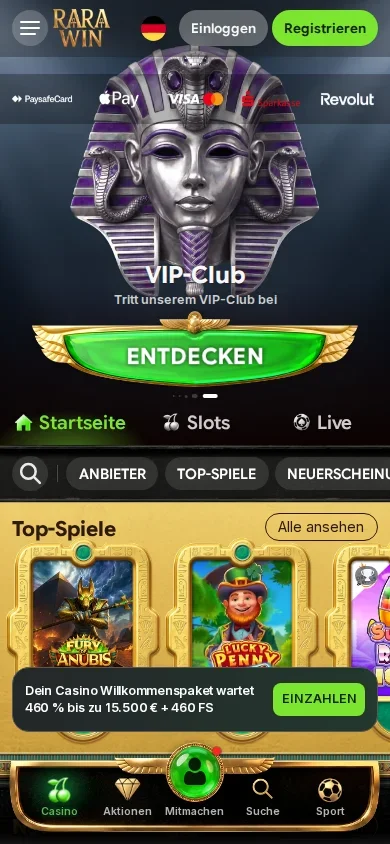
With the Rarawin app, we bring your sign-in, game collection, deposits, withdrawals and support into one place. Registration gives you one account shared between our application and browser service, rather than separate profiles to manage. Your existing credentials work across both routes. That means choosing how to connect does not mean starting again or maintaining another balance. From browsing something unfamiliar to finding help with a payment, we put those practical tasks alongside play instead of treating them as separate services.
Touch controls make the Rarawin app comfortable to use in portrait or landscape. Choose whichever position suits your handset and available space.
Our catalogue contains more than 5,000 games, with search available when you already know what you want. Browsing categories offers another starting point when you would rather explore. We provide two ways into one service: an installed application or access through a mobile browser. Neither changes why we offer personal controls alongside entertainment. Set a budget beforehand and choose a moment that suits you, rather than letting a session decide either for you. Requirements and storage sizes sit together in the Platforms table, so comparing your hardware takes less hunting. For players who prefer a dedicated icon, the Rarawin app keeps that route close at hand.
Features of the Rarawin app
We built the Rarawin app around finding games, managing money and reaching assistance without losing track of your profile. Those core functions match our site rather than creating a separate service with different credentials. Search begins from your home screen, while financial actions and security controls have named destinations, making the route back to each task easier to remember.
| Feature | Where in Our App | Details |
|---|---|---|
| Game catalogue | Home screen and Search | 5,000+ games |
| Deposits | Menu > Wallet > Deposit | Visa, Mastercard, Skrill, Neteller; minimum 20 EUR; maximum 1000 EUR; credited instantly |
| Withdrawals | Menu > Wallet > Withdraw | Minimum 50 EUR; maximum 3000 EUR; processed from a few hours to 2 business days |
| Account and login | Menu > Settings > Security | One registration; existing login details work through both access routes |
| Support | Menu > Help > Contact Support | support@rarawincasino.eu; reply within 24 hours |
| Touch navigation | Any screen | Portrait and landscape layouts; swipe between categories |
An installation gives the Rarawin app its own place among your other applications. Browser access needs nothing installed, so it remains a different route rather than another product.
Once setup is complete, everyday use follows the same pattern: choose entertainment, manage funds or open assistance when needed. We do not ask you to learn a different service simply because you chose another screen. Keeping familiar destinations matters more than adding extra steps. That practical continuity is what we want players to notice when using the Rarawin app.
Platforms and Requirements
Before getting the Rarawin app, find your system version and available storage. On iPhone or iPad, open Settings > General > About for software details, then iPhone Storage or iPad Storage for free space. Android lists its version under Settings > About Phone and available capacity under Settings > Storage. Comparing those entries avoids an interrupted setup.
| Device | Minimum Version | Space and Memory | Source | Install Time |
|---|---|---|---|---|
| iPhone and iPad | iOS 15.0 or iPadOS 15.0 | 164 MB | App Store or steps shown on rarawincasino.eu | About a minute |
| Android phones and tablets | Android 10.0 | 128 MB; 3 GB RAM | Google Play or file on rarawincasino.eu | About two minutes |
| Browser | Chrome, Safari, Firefox | Nothing to install | rarawincasino.eu | No installation |
The Rarawin app has specific hardware requirements, while browser access suits older equipment or limited storage. That distinction gives you a practical alternative without another registration.
Your existing profile and game collection remain available through either route. Use the listed software requirements as the starting point, rather than assuming free storage alone guarantees compatibility. A handset needs both a supported operating system and sufficient capacity for its installation. Choosing browser access instead of the Rarawin app removes that installation step without changing the service you reach.
How to Download the Rarawin app
Have your login details ready before opening the Rarawin app for the first time. Allow about two minutes for downloading over a stable connection, with the free space listed in our requirements table available beforehand. Keeping those details nearby lets you move from setup to signing in without stopping to recover credentials halfway through.
- Open rarawincasino.eu through your mobile browser and enter our application section. Start there so your next step matches the available installation route.
- Select your device type. Choose the option matching your operating system rather than following instructions intended for a different handset.
- On iPhone or iPad, continue to the App Store or follow the steps displayed on our site. Complete that route before attempting to open your installation.
- On Android, get the 128 MB package through Google Play or our site. For direct installation, Android asks once for permission to install from this source.
- Open the Rarawin app and sign in. Your balance and history are already there, so you do not need to transfer them manually.
Network access lets the Rarawin app connect to our service, while notification permission enables payout and new-game alerts. Neither permission grants access to your personal address book.
We never request contacts, photos or location. Those are not needed for playing, managing funds or receiving the alerts you choose. Understanding that distinction helps separate an expected permission prompt from an unrelated request. Notifications serve a defined purpose here, rather than being a condition for browsing games or using financial controls.
App Settings Worth Switching On
The settings our players use most sit together under Settings, keeping personal controls close to security and display preferences. Within the Rarawin app, those choices cover access, alerts, spending boundaries and breaks. We give each control its own action so changing one preference does not mean working through unrelated options or adjusting everything at once.
- Biometric login: Menu > Settings > Biometric Login enables Face ID or fingerprint access. Choose the method supported by your handset for a familiar way to sign in.
- Push notifications: Menu > Settings > Notifications controls alerts about payouts and new games. Keep these choices tied to information you actually want to receive.
- Deposit limit: Menu > Settings > Deposit Limit lets you choose a daily, weekly or monthly boundary. Set that boundary around money reserved for entertainment, not essential expenses.
- Session reminder: Menu > Settings > Session Reminder offers 30 or 60 minutes. Choose an interval that gives you a clear opportunity to pause and reassess.
- Demo mode: Menu > Settings > Demo Mode provides practice on every slot. Within the Rarawin app, this gives unfamiliar games a separate starting point before money is involved.
- Language and currency: Menu > Settings > Language and Currency controls those display preferences. English and USD provide the language and money display used on this page.
Gambling is entertainment within a budget decided beforehand, never income. We ask every player to set a deposit limit and session reminder before making their first deposit.
Those controls serve different purposes: one establishes a spending boundary, while the other creates a moment to stop and consider elapsed play. Neither turns gambling into a way to earn money or removes its risks. Our responsible gaming page explains the remaining tools and information. Keeping both preferences deliberate helps the Rarawin app fit around your plans rather than letting entertainment determine them.
Troubleshooting Download and Access Issues
Start with the exact message on your screen rather than repeating every setup step. A storage warning needs a different response from an operating-system mismatch. For the Rarawin app, identifying that difference first keeps troubleshooting focused and avoids changing settings that have nothing to do with the interruption.
| What You See | Why | What to Do |
|---|---|---|
| Download stops halfway | The connection was interrupted | Retry using a stable connection |
| “Not enough space” | Available storage cannot hold the package | Remove an unused application through your storage settings |
| “Install blocked” on Android | Direct installation permission is disabled | Enable Allow From This Source for your browser |
| “App not compatible” | Your operating system is below the supported version | Use Software Update to install a supported version |
| Application opens then closes | Its current session has stopped responding | Restart your handset |
| Login works in browser but not after installation | Saved credentials differ from those entered in browser | Enter your working credentials manually |
A precise description helps us investigate the Rarawin app without asking you to repeat the whole story. Note whether the interruption happens during downloading, opening or signing in.
Browser access stays available meanwhile. If the issue persists, write to support@rarawincasino.eu with your phone model, system version and exactly what appeared onscreen; we reply within 24 hours. Include the wording of any error rather than only saying something failed. That gives our team a clearer starting point when investigating your Rarawin app access.
Download the Rarawin Casino App
Our mobile version brings 5,000+ games together with your existing balance and playing history. Download our native iOS application from the App Store or our Android application from Google Play. Sign in with your existing details, then use game search, manage deposits and withdrawals, or adjust your personal limits.
Set your limits before your first session.
Last updated: